
Waiting on them
No reply is a state—not a plan for what to do next.
Check what is actually missing, choose a sensible checkpoint, and use the latest response to decide who needs to act.
7-day trial for genuinely new accounts, or a 30-day trial with a valid active Referral ID. View access and pricing.
Start by checking the existing conversation
The input may already be in an email, chat or file-sharing location. SaathKaam does not read those channels for you. Check before recording No reply or sending another request.
Ask for the specific reply, document or decision still needed. “Could you confirm when the signed document will arrive?” gives more context than an unexplained nudge.
Use the actual outcome to choose the next step
No reply, a partial response and a request for more time are different results. Record what happened without turning “I sent a message” into “They agreed.”
If the person asks for more time, record the new Target date explicitly. If they need something from you first, change the responsibility to Your turn rather than leaving the item on Waiting on them.
A checkpoint is not permission to chase automatically
Choose a date that reflects the conversation and the situation. There is no universal follow-up interval that fits every client or piece of work.
A Reminder can prompt your own attention when supported and enabled. It does not contact the other person. Changing a planned action time also does not silently change reminder intent.
Keep the outcome in view
When the requested input arrives, record the outcome and mark that request Done if it is resolved. A new task for you may deserve its own Follow-up.
When returning after several days, the Timeline helps you recover the recorded context. It cannot reconstruct conversations you never recorded or automatically infer what happened outside the app.
Try the model
Confirm when the signed document will arrive
Friday passed without Ravi’s signed document. Before following up again, check the existing conversation and whether the document arrived elsewhere.
Synthetic scenario. Names, work and checkpoints are fictional.
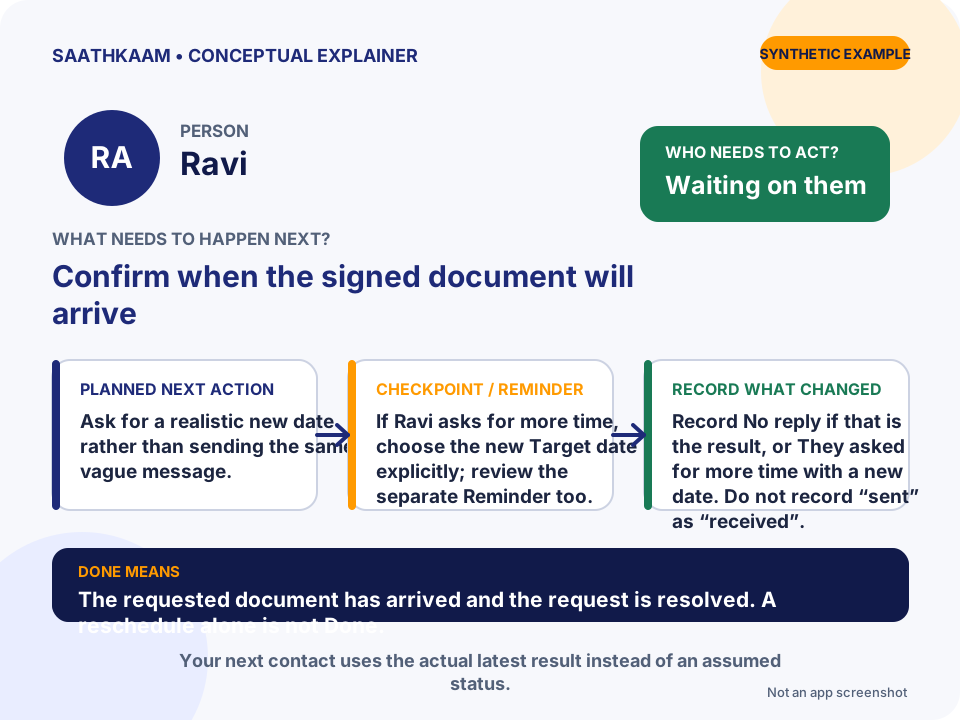
- Who
- Ravi
- Follow-up
- Confirm when the signed document will arrive
- Whose turn
- Waiting on them
- Planned next action
- Ask for a realistic new date rather than sending the same vague message.
- Target date / Reminder
- If Ravi asks for more time, choose the new Target date explicitly; review the separate Reminder too.
- What changes in the Timeline
- Record No reply if that is the result, or They asked for more time with a new date. Do not record “sent” as “received”.
- What Done means
- The requested document has arrived and the request is resolved. A reschedule alone is not Done.
Choose one unfinished interaction.
Think of someone you are waiting for—or a promise you still need to keep. Add that Person and one clear Follow-up. Leave optional details until they are useful.
Try SaathKaam on Web