
Revisions and clarifications
Clarify the change before it becomes another revision.
Understanding feedback, doing the work and getting the next decision are different steps. Make the current step visible.
7-day trial for genuinely new accounts, or a 30-day trial with a valid active Referral ID. View access and pricing.
Turn unclear feedback into a useful question
“Make it brighter” could mean the background, the image or the headline. Ask which element should change before treating the revision as ready for you to do.
Record the clarification you need on Waiting on them. Keep the design file and detailed review conversation in the existing creative tools.
Switch turns when the instruction is clear
Once the client clarifies the request, Record outcome. Making or arranging the revision is now Your turn. A planned Review or Send action is an intention, not a completed activity.
After you send the revised draft through the normal channel, record that action. If a review decision is still needed, make that next step explicit rather than leaving the list stuck on your previous task.
Do not combine every change into one endless item
Separate Follow-ups when changes have different decisions, people or resolution criteria. You can finish a clarification without claiming the full deliverable has been approved.
If the same matter becomes active again, reopen it. For a fresh occurrence, Duplicate creates a new draft; it does not copy the old Timeline, reminder or planned-action list.
This is follow-up context, not version control
SaathKaam does not host design versions, annotate files or collect proofing approvals. It helps you record which interaction still needs attention.
Use the Timeline for the meaningful changes you record. The goal is to return with enough context for the next conversation—not to reproduce the whole project history.
Try the model
Clarify the requested colour change
Meera’s feedback on the campaign is unclear. The designer can make the change, but you first need to know which element she means.
Synthetic scenario. Names, work and checkpoints are fictional.
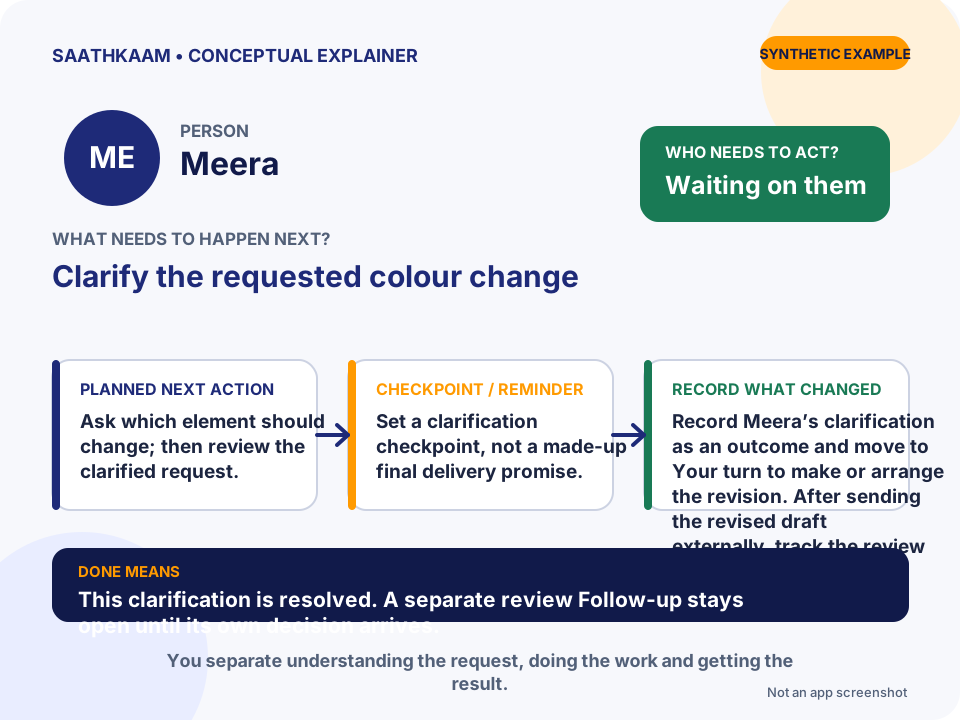
- Who
- Meera
- Follow-up
- Clarify the requested colour change
- Whose turn
- Waiting on them
- Planned next action
- Ask which element should change; then review the clarified request.
- Target date / Reminder
- Set a clarification checkpoint, not a made-up final delivery promise.
- What changes in the Timeline
- Record Meera’s clarification as an outcome and move to Your turn to make or arrange the revision. After sending the revised draft externally, track the review as Waiting on them.
- What Done means
- This clarification is resolved. A separate review Follow-up stays open until its own decision arrives.
Choose one unfinished interaction.
Think of someone you are waiting for—or a promise you still need to keep. Add that Person and one clear Follow-up. Leave optional details until they are useful.
Try SaathKaam on Web